


 Shift+F3 converts a selection of text to uppercase.
You can normally access this dialog by choosing the "Tools | AutoCorrect Options..." menu command or the "AutoCorrect Options..." command of the drop-down menu
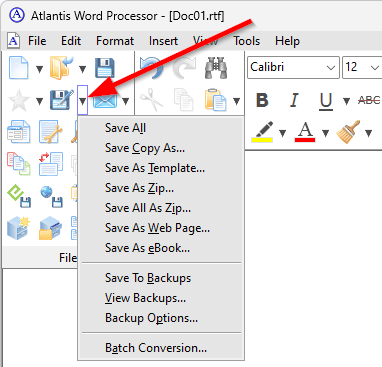
When a toolbar button has a drop-down menu, a small "down arrow" button is displayed to the right of this tolbar button. By clicking this small button, you can open the corresponding drop-down menu with additional related commands:
 of the AutoCorrect
  button of the Tools toolbar
 , then clicking the Rules... button.
In this dialog you can customize the Smart space management options of the Atlantis AutoCorrect.
You can specify which punctuation signs require a space before, and which require a space after.
Use the Character map  buttons to add punctuation signs to the corresponding edit box.
You can modify the contents of these edit boxes in the same way as you modify contents of ordinary edit boxes. For example, to delete a punctuation sign, select it, then press the Del key.
If the Allow double space between sentences box is checked, Atlantis will not remove double spaces between sentences.
A non-breaking space might be inserted by the AutoCorrect at times instead of an ordinary space so that line wrapping will not separate a word from its associated punctuation mark. If the Use nonbreaking spaces box is checked, Atlantis will insert nonbreaking spaces when required. Otherwise ordinary spaces will be used.
The "Smart Space Management" dialog for the French language includes additional options related to the French typography:

You can specify when Atlantis should use thin nonbreaking spaces (U+202F) instead of regular nonbreaking spaces (U+00A0) in French texts.
See also...


