You can print a selection from the active document. Press Ctrl+P to bring up the "Print" window, and check the "Selection" box.
The font format controls the basic look and feel of document text. It includes the following options:
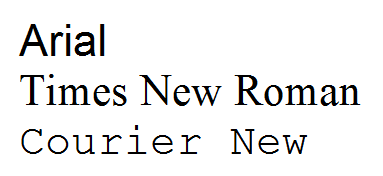
A font (or a typeface) is a set of glyphs that share common design features, such as the width of the thick and thin strokes that compose the characters and the presence or absence of serifs.
Below are examples of fonts:
Font sizes are specified in points (1 pt = 1/72 inch):
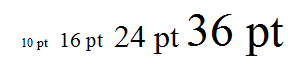
Font sizes can include half a point. For example: 8.5, or 12.5
Document text can be displayed in various colors:

The "Auto" font color is printed as black on paper. On screen it also shows as black in most cases. But the "Auto" font color might show as a different color depending on the Display properties of Windows and the current color scheme of Atlantis.
Highlight adds a background color to a text fragment:

Atlantis can display lines of various shapes, thickness, and color below the text:

When the "Auto" underline color is selected, the actual color of the underline matches the font color of the text. For example, if the text is formatted with the blue font color, the underline will be blue, too.
Bold makes a text become darker and a little bigger:

Italic texts normally slant slightly to the right:

When a character is formatted with "strikeout", Atlantis draws a horizontal line through this character:

Same as "strikeout" but a double line is drawn:

Characters formatted with "superscript", display as an upper index of mathematical formulas:

Characters formatted with "subscript", display as a lower index of mathematical or chemical formulas:

A lowercase letter formatted with "small caps", displays as a capital letter of a reduced size:

Small caps formatting does not affect numbers, punctuation, nonalphabetic characters, or uppercase letters.
A letter formatted with "all caps", always displays in uppercase.
Adds a shadow to a character:

When a character is formatted with "outline", Atlantis displays the inner and outer borders of this character:

When a character is formatted with "emboss", Atlantis displays it as if it is raised off the page in relief:

When a character is formatted with "engrave", Atlantis displays it as if it is imprinted or pressed into the page:

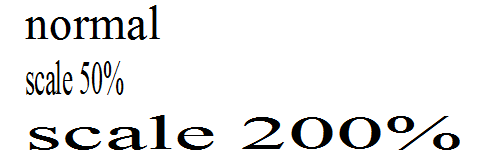
Stretches or compresses text horizontally:
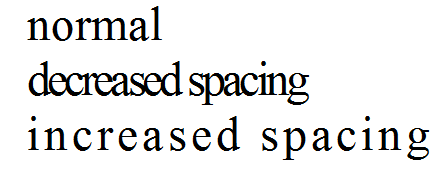
Decreases or increases intercharacter spacing:
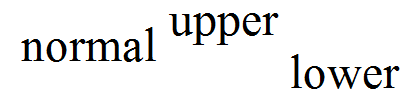
Displays text with a vertical offset:
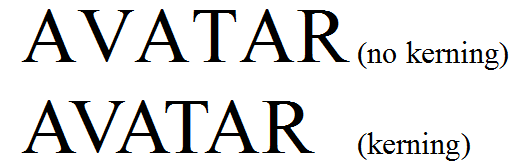
Some fonts contain information about pairs of characters which could be placed more tightly or spaced more evenly within a paragraph line to produce more even and natural appearance of text.
A minimal font size of characters to apply kerning to is specified. As a rule, kerning is used for larger font sizes.