
Select List with numbers
-
franklinreid
- Posts: 27
- Joined: Sat Jul 02, 2011 1:19 pm
Select List with numbers
It's easy to create a numbered list from a list of items. How can I select and copy that list? It only captures the text, not the numbers. If I wish to put it into another text program I have to renumber it.

When you copy a text fragment in Atlantis to the clipboard, Atlantis puts the selected text onto the clipboard in two formats: "rich text format" and "plain text". Automatic numbering/bulleting (if any) gets included in the "rich text format" clip. The "plain text" clip naturally includes no automatic numbering/bulleting.
As I understand, you paste to a "plain text editor" that does not support rich formatted clipboard data.
There is a workaround:
1. right-click any item of your automatic numbered list in Atlantis,
2. choose the "Simple numbered list > Convert to manual list" menu command:
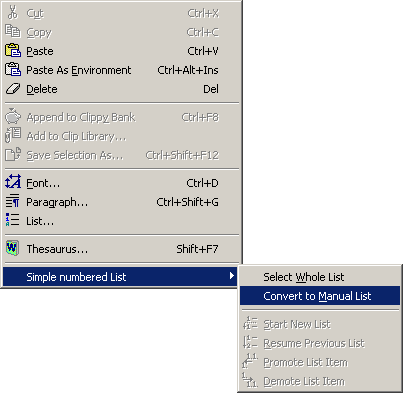
3. select the entire list (including the list numbers), and copy the selection to the clipboard,
4. paste to your plain text editor,
5. in Atlantis, press Ctrl+Z to "undo".
As I understand, you paste to a "plain text editor" that does not support rich formatted clipboard data.
There is a workaround:
1. right-click any item of your automatic numbered list in Atlantis,
2. choose the "Simple numbered list > Convert to manual list" menu command:
3. select the entire list (including the list numbers), and copy the selection to the clipboard,
4. paste to your plain text editor,
5. in Atlantis, press Ctrl+Z to "undo".
-
franklinreid
- Posts: 27
- Joined: Sat Jul 02, 2011 1:19 pm
