I have chapter names that are long and Kindle just loves to do interesting things with them.
No, I don't want to shorten them.
In the body of Atlantis I can make the second line indent and it looks good.
In the TOC I can indent but when TOC is updated the indent disappears and the second line comes out flush.
Is there a way to indent the second line of a chapter name in TOC?
TOC indent
Hi,
As far as I know, this is not possible if you create or update the TOC using the automatic “Insert | Table Of Contents…”, or “Update Entire Table” commands.
But you can reformat the TOC items manually to display in the same way as the document headings: simply press “Shift+Enter” to insert a line break at the appropriate places in the TOC.
HTH.
Cheers,
Robert
As far as I know, this is not possible if you create or update the TOC using the automatic “Insert | Table Of Contents…”, or “Update Entire Table” commands.
But you can reformat the TOC items manually to display in the same way as the document headings: simply press “Shift+Enter” to insert a line break at the appropriate places in the TOC.
HTH.
Cheers,
Robert

Just adjust the "TOC 1" style in your document in the way you need.
First, apply the desired indent to any item of your table of contents.
Then, click the "Update highlighted style to match document selection" button of the Styles panel of the Atlantis Control Board.
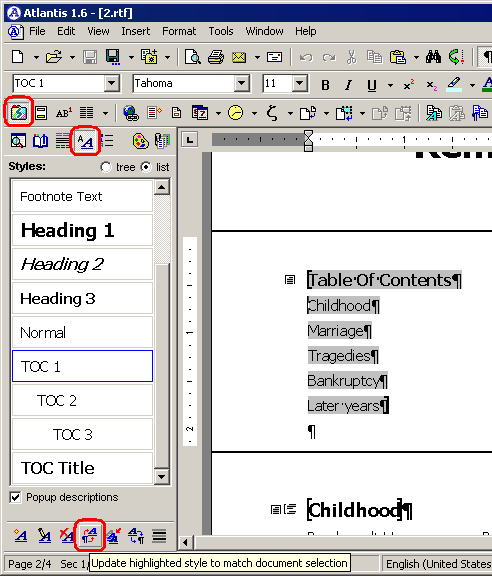
You can also adjust the "TOC 1" style through the "Format | Style... > TOC 1 > Modify... > Paragraph..." dialog.
First, apply the desired indent to any item of your table of contents.
Then, click the "Update highlighted style to match document selection" button of the Styles panel of the Atlantis Control Board.
You can also adjust the "TOC 1" style through the "Format | Style... > TOC 1 > Modify... > Paragraph..." dialog.
