Since I downloaded the new WordWeb 6 last night I noticed that the Replace button never appears in it when I click the word in Atlantis and select Thesaurus from the drop-down menu. (I mean, it never appears, even if you go to a new word in WordWeb.) Interestingly, if I click the word and open WordWeb from the Quick Launch bar, the Replace button comes up immediately, even though I doubt there would ever be a need to replace a word with itself.
I've also written to the WordWeb folks about this, because I'm not sure whether the problem lies in WordWeb or Atlantis.
Replace Button in WordWeb

Do you select anything in your document before calling the Thesaurus command of Atlantis? If you have a partially selected word in your Atlantis document, or there is no word at the current caret position in your document, Atlantis asks WordWeb to display the "Copy" button instead of the "Replace" button. There are more situations when the direct "replace" function is not possible.
If you right-click an unselected word in Atlantis, and choose the "Thesaurus..." command, the WordWeb window is supposed to have the "Replace" button. I cannot notice anything wrong in the latest free version of WordWeb 5.52.
If you right-click an unselected word in Atlantis, and choose the "Thesaurus..." command, the WordWeb window is supposed to have the "Replace" button. I cannot notice anything wrong in the latest free version of WordWeb 5.52.
Yes, I've tried just placing the insertion point within the word and also selecting the whole word. There is no difference in result. Right-clicking on an unselected word also brings up the Copy button. I've not been able to find a way to get the Replace button to appear when using the menu. (Of course, while in WordWeb if you navigate to another word, the Replace button should appear and never does.)
Now, I don't use Replace that much, but my perception is that all worked well until the latest version of WordWeb. There's a good chance it's their problem.
Now, I don't use Replace that much, but my perception is that all worked well until the latest version of WordWeb. There's a good chance it's their problem.
To resurrect an old thread...
I'm using Wordweb Pro v6.72 (latest as of two days ago). If I put the insertion point in a word and execute my hotkey (ctrl+F11), WWP does not ever display 'Replace'.
If I highlight a word and execute my hotkey, WWP only pops up about one time in twenty. If and when it does decide to pop up, then it displays 'Replace'
WWP works as expected with every other program I use - yes, even Opera.
This behavior is nothing new. It's been this way for the last couple of years. I just despaired of getting it working properly.
Regards,
Paul
I'm using Wordweb Pro v6.72 (latest as of two days ago). If I put the insertion point in a word and execute my hotkey (ctrl+F11), WWP does not ever display 'Replace'.
If I highlight a word and execute my hotkey, WWP only pops up about one time in twenty. If and when it does decide to pop up, then it displays 'Replace'
WWP works as expected with every other program I use - yes, even Opera.
This behavior is nothing new. It's been this way for the last couple of years. I just despaired of getting it working properly.
Regards,
Paul
As I understand, Ctrl+F11 is the "Keyboard HotKey to look up selected text" in your WordWeb Pro. Have you tried using the Atlantis "Thesaurus" hot key (by default, Shift+F7)? It is a preferable way to look up words in Atlantis because it does not put anything onto the clipboard. And it does not require WordWeb to be running in background.
Hi,
Latest WordWeb Pro version is 6.76. Updates are available from http://wordweb.info/users.html?lic=U092 ... &version=6.
WordWeb Pro 6.76 works fine on my Windows XP SP3 system.
My WordWeb Pro hotkey is “Shift+F7”.
Now if I open Atlantis without launching WordWeb Pro concurrently (previously as an executable), it is indifferent whether I select a word, or place the insertion cursor in it. WordWeb Pro always pops up with the corresponding definition after I have pressed “Shift+F7”. And the “Replace” button is available in both cases.
On the other hand, if I run both Atlantis and WordWeb Pro concurrently (both executables are launched), WordWeb Pro does pop up with the corresponding definition after I have pressed “Shift+F7”. But the “Replace” button will only show up if the word is entirely selected within Atlantis. When the insertion point is within a word, WordWeb Pro pops up without its “Replace” button.
Also note that my Comodo Firewall had decided to restrict execution of WordWeb Pro all of its own. I had to remove that restriction manually.
HTH.
Cheers,
Robert
Latest WordWeb Pro version is 6.76. Updates are available from http://wordweb.info/users.html?lic=U092 ... &version=6.
WordWeb Pro 6.76 works fine on my Windows XP SP3 system.
My WordWeb Pro hotkey is “Shift+F7”.
Now if I open Atlantis without launching WordWeb Pro concurrently (previously as an executable), it is indifferent whether I select a word, or place the insertion cursor in it. WordWeb Pro always pops up with the corresponding definition after I have pressed “Shift+F7”. And the “Replace” button is available in both cases.
On the other hand, if I run both Atlantis and WordWeb Pro concurrently (both executables are launched), WordWeb Pro does pop up with the corresponding definition after I have pressed “Shift+F7”. But the “Replace” button will only show up if the word is entirely selected within Atlantis. When the insertion point is within a word, WordWeb Pro pops up without its “Replace” button.
Also note that my Comodo Firewall had decided to restrict execution of WordWeb Pro all of its own. I had to remove that restriction manually.
HTH.
Cheers,
Robert
Hi Admin & Robert,
I'm now using WWP 6.76.
I changed my hot key combo to Ctrl+F7, as suggested, but it made no difference at all.
I have WWP start with Windows so I can use it in OpenOffice Writer and other programs.
To reiterate, If I highlight a word in OpenOffice et al, and execute my hot key, the WWP pops up. If I do the same thing in Atlantis, then WWP does not pop up (with either ctrl+F11 or ctrl+F7). I can of course just use Atlantis differently to any other program and remember to just set the insertion point in a word rather than highlight it, but using it in that fashion means I cannot use the 'phrase' function of WWP.
Thanks anyway for trying to help.
Paul
I'm now using WWP 6.76.
I changed my hot key combo to Ctrl+F7, as suggested, but it made no difference at all.
I have WWP start with Windows so I can use it in OpenOffice Writer and other programs.
To reiterate, If I highlight a word in OpenOffice et al, and execute my hot key, the WWP pops up. If I do the same thing in Atlantis, then WWP does not pop up (with either ctrl+F11 or ctrl+F7). I can of course just use Atlantis differently to any other program and remember to just set the insertion point in a word rather than highlight it, but using it in that fashion means I cannot use the 'phrase' function of WWP.
Thanks anyway for trying to help.
Paul
Hi Paul,
We did write “Shift+F7”, not “Ctrl+F7”. Have you tried using “Shift+F7”?
Here are my WordWeb Pro Hot Key settings:
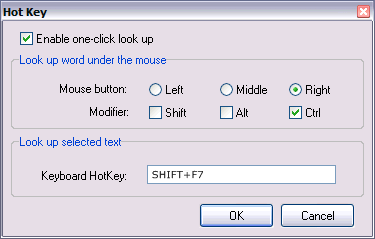
And my Atlantis “Thesaurus” Hot Key:
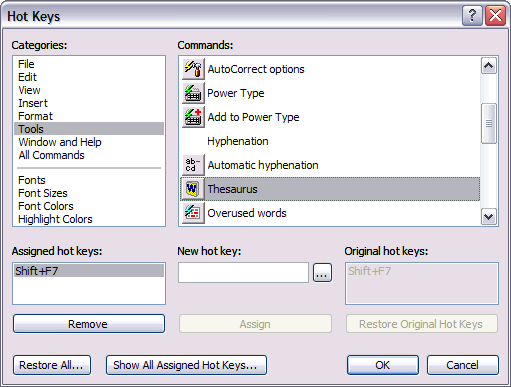
Now if I open either Firefox, Thunderbird, Outlook Express, Windows WordPad, OpenOffice.org Writer, MS Word 2007, or Atlantis, to name only a few, then select a word or a phrase within their respective document windows, and press “Shift+F7”, WordWeb Pro pops up with the corresponding definition, and the WordWeb Pro “Replace” button is available.
Note that as I just hinted, the WordWeb Pro “phrase” function is working in all the above applications.
Please try using “Shift+F7”.
HTH.
Cheers,
Robert
We did write “Shift+F7”, not “Ctrl+F7”. Have you tried using “Shift+F7”?
Here are my WordWeb Pro Hot Key settings:
And my Atlantis “Thesaurus” Hot Key:
Now if I open either Firefox, Thunderbird, Outlook Express, Windows WordPad, OpenOffice.org Writer, MS Word 2007, or Atlantis, to name only a few, then select a word or a phrase within their respective document windows, and press “Shift+F7”, WordWeb Pro pops up with the corresponding definition, and the WordWeb Pro “Replace” button is available.
Note that as I just hinted, the WordWeb Pro “phrase” function is working in all the above applications.
Please try using “Shift+F7”.
HTH.
Cheers,
Robert