Windows XP SP-3. Atlantis is up-to-date.
If I attempt to open a file in a shared network folder from the Open Document dialogue in Atlantis, the programme will always crash. This is eventually followed by the Tell-Microsoft-About_It box.
If I open the file via a file manager (Total Commander or Explorer) it works perfectly. Also if I 'GUI-navigate' to the machine and file via the Open Document dialogue I can load it.
Very odd. The syntax I'm using at the [Filename] slot of Open Document is:
\\dd\Documents\Confirm.rtf
Regards,
Jim.
Atlantis Crashing
Atlantis Crashing
Regards,
Cheemag
[Registered User]
Windows-7 Professional 64-bit
Cheemag
[Registered User]
Windows-7 Professional 64-bit

What if you choose "No preview" at the top of the "Open document" window before typing anything in the "Filename" box:
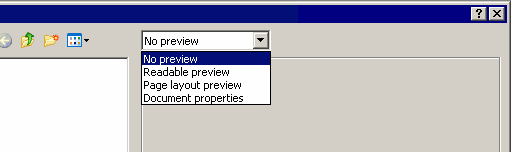
Are you sure that Windows says that the error occured within Atlantis.exe? Could you post screen captures of the error?
Are you sure that Windows says that the error occured within Atlantis.exe? Could you post screen captures of the error?
I thought it was a Windows thing as XP isn't too clever when it comes to networks, but your 'No Preview' suggestion seems to have cured the problem.admin wrote:What if you choose "No preview" at the top of the "Open document" window before typing anything in the "Filename" box:
Are you sure that Windows says that the error occured within Atlantis.exe? Could you post screen captures of the error?
From the length of time it took for the 'Tell MS about it' box to come up, I assume it's a Windows timeout problem.
However, cured now.
Thanks very much.
--
Cheemag
Regards,
Cheemag
[Registered User]
Windows-7 Professional 64-bit
Cheemag
[Registered User]
Windows-7 Professional 64-bit