I haven't been able to find any answers here for this issue that made any sense to me.
I have my personal color scheme exactly as I want it, but for the area where the toolbars reside. That area is a pail yellow and I can't find a way to change it. I even tried changing my windows xp colors but that had no effect, either. Does anyone know how to do this?
Toolbar Area Background Color Change

Please do the following:
1. Right-click on a blank area of the Windows Desktop, and choose the "Properties..." command from the menu.
2. On the "Themes" tab, click the "Save As..." button, and save your current theme to a file.
3. Email the theme file to support@AtlantisWordProcessor.com.
1. Right-click on a blank area of the Windows Desktop, and choose the "Properties..." command from the menu.
2. On the "Themes" tab, click the "Save As..." button, and save your current theme to a file.
3. Email the theme file to support@AtlantisWordProcessor.com.
Thanks for the .theme file. Here is how the Atlantis toolbars look under your Windows theme on my system:
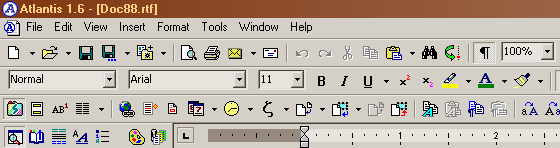
I see no yellow color.
Could you please post your screen capture?
I see no yellow color.
Could you please post your screen capture?
Here's the pic. I think I through you a curved ball. I was playing around with my themes between the time I posted my first post and you got back to me. I've tried every option in the advanced settings of windows, changing the color of every single choice on the list, but got no results in Atlantis.
What completely baffles me is this: You put just about every color under the control of Atlantis via Tools/Options/Colors but for that toolbar area. Why didn't you include that as well?
BTW, I went back and reset windows theme to what I had when I first wrote this post. The yellow is back but I want brown. What specific thing in Windows controls that? Or is there something in the Atlantic.ini file I can change?
What completely baffles me is this: You put just about every color under the control of Atlantis via Tools/Options/Colors but for that toolbar area. Why didn't you include that as well?
BTW, I went back and reset windows theme to what I had when I first wrote this post. The yellow is back but I want brown. What specific thing in Windows controls that? Or is there something in the Atlantic.ini file I can change?
- Attachments
-
- Picture001.jpg (119.21 KiB) Viewed 8993 times
I see that having the .theme file was not sufficient to reproduce your theme display.
Anyway toolbars used in Atlantis are not proprietary controls of Atlantis. Atlantis uses the corresponding standard Windows visual control. Atlantis does not draw the background of toolbars. Windows does.
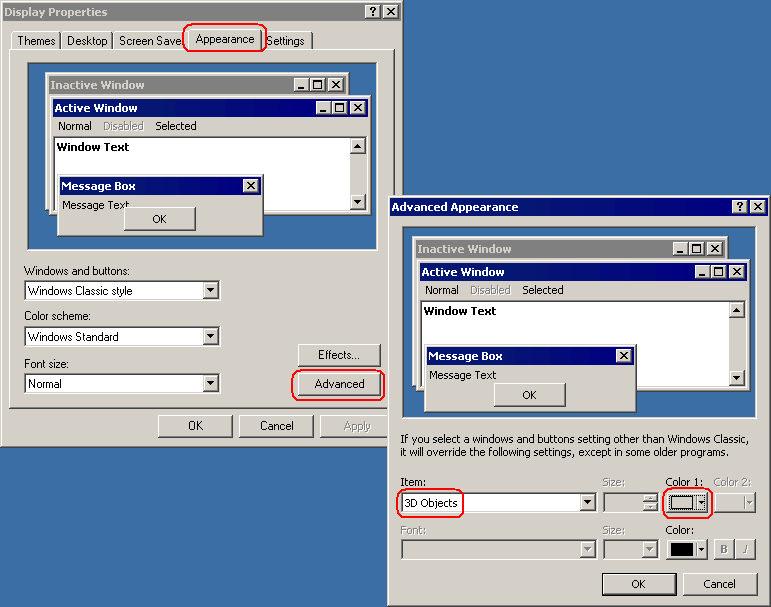
In most cases, the background of toolbars is controlled through the "Color 1" of "3D Objects" in the "Advanced Appearance" of the Windows "Display Properties":
Anyway toolbars used in Atlantis are not proprietary controls of Atlantis. Atlantis uses the corresponding standard Windows visual control. Atlantis does not draw the background of toolbars. Windows does.
In most cases, the background of toolbars is controlled through the "Color 1" of "3D Objects" in the "Advanced Appearance" of the Windows "Display Properties":