Hello again,
Internet addresses, which I had hoped to keep as words were being printed in blue despite my having set >Tools >Options >Edit to 'Treat internet addresses as words'.
I have had to resort to subterfuge: in the same window I set the hypherlinks colour to black !
Regards,
Jim.
Internet Addresses
Internet Addresses
Regards,
Cheemag
[Registered User]
Windows-7 Professional 64-bit
Cheemag
[Registered User]
Windows-7 Professional 64-bit

The "Treat internet addresses as words" option allows to select Internet addresses as ordinary words. For example, when this option is on, you could quickly select an Internet address by double-clicking it.
You might wish to adjust the "Default formatting for hyperlinks" settings on the "Edit" tab of the "Tools | Options..." dialog:
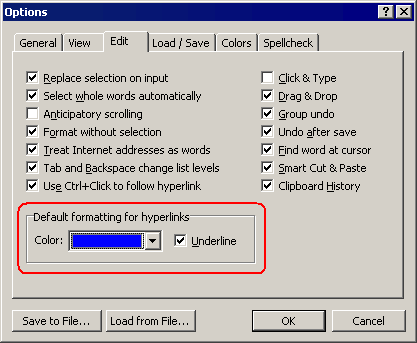
These settings are used by Atlantis every time it creates a new hyperlink (hyperlinks can be created by the AutoCorrect, or through the "Insert | Hyperlink..." command). You can instruct Atlantis to underline or not underline new hyperlinks as well as specify the desired color for new hyperlinks.
Please also see the following topic of the Atlantis Online Help:
Deactivating all hyperlinks in a document
You might wish to adjust the "Default formatting for hyperlinks" settings on the "Edit" tab of the "Tools | Options..." dialog:
These settings are used by Atlantis every time it creates a new hyperlink (hyperlinks can be created by the AutoCorrect, or through the "Insert | Hyperlink..." command). You can instruct Atlantis to underline or not underline new hyperlinks as well as specify the desired color for new hyperlinks.
Please also see the following topic of the Atlantis Online Help:
Deactivating all hyperlinks in a document
Surely the answer is in AutoCorrect Options:admin wrote:The "Treat internet addresses as words" option allows to select Internet addresses as ordinary words. For example, when this option is on, you could quickly select an Internet address by double-clicking it.
You might wish to adjust the "Default formatting for hyperlinks" settings on the "Edit" tab of the "Tools | Options..." dialog:
These settings are used by Atlantis every time it creates a new hyperlink (hyperlinks can be created by the AutoCorrect, or through the "Insert | Hyperlink..." command). You can instruct Atlantis to underline or not underline new hyperlinks as well as specify the desired color for new hyperlinks.
Please also see the following topic of the Atlantis Online Help:
Deactivating all hyperlinks in a document
[ ] Format Internet addresses with hyperlinks
i.e. unticked ??
Found after digging a bit further.
Thanks to both for the solutions - (I seldom need hypherlinks, hence the question).
Regards,
Cheemag
[Registered User]
Windows-7 Professional 64-bit
Cheemag
[Registered User]
Windows-7 Professional 64-bit
Hi Cheemag,
When “Treat internet addresses as words” is checked on the “Edit” tab of the “Tools | Options..." dialog, the Internet addresses that Atlantis has identified as such in the background are literally “treated as single words”, i.e. they can be selected with a double click. When “Treat internet addresses as words” is unchecked, and you double click on something that you identify as an Internet address in a document, only a fraction of that address is likely to be selected (the part that most closely looks like a whole word of the English language).
Let’s take the following URL as an example:
http://www.atlantiswordprocessor.com/en ... php?t=1468
If “Treat internet addresses as words” is on, and you click on any fragment of the above URL in the Atlantis document window, the whole address will be selected as a single “word”. For example, if you click on “forum”, the whole URL will be selected automatically.
If “Treat Internet addresses as words” is off, and you click on any fragment of the above URL in the Atlantis document window, only the “word” that you have clicked on will be selected. If you click on “forum”, only “forum” will be selected.
When “Format Internet addresses with hyperlinks” is on in the AutoCorrect options, Atlantis converts any Web URL that it finds to an active clickable hyperlink.
When “Format Internet addresses with hyperlinks” is off in the AutoCorrect options, Atlantis leaves any Web URL that it finds as is, i.e. as an unformatted string of text.
So, as you found out, if you want to have your Internet addresses treated as unformatted “words” by Atlantis, you have to deactivate “Format Internet addresses with hyperlinks” in the AutoCorrect options.
This said, as a rule and internally, Atlantis systematically tries to identify the Internet addresses present in documents as such. This is simply part of determining which is which in the flow of text (nouns, adjectives, verbs, etc, i.e. sentence parts). This has consequences. If you press and hold the Ctrl key down, and hover your mouse over a Web URL in a document, your mouse pointer will change into a hand shape. If you then give a left click, Atlantis will open the clicked URL in your default browser. Note that this property doesn’t affect the way the URL is displayed or printed. It only makes it ultimately clickable, should you decide to visit the corresponding URL.
In other words, irrespective of whether “treat Internet addresses as words” and “Format Internet addresses with hyperlinks” is on or off in Atlantis, all Internet addresses are treated as clickable hyperlinks when you hold the Ctrl key down and hover your mouse over a Web URL in the Atlantis document window.
HTH.
Cheers,
Robert
When “Treat internet addresses as words” is checked on the “Edit” tab of the “Tools | Options..." dialog, the Internet addresses that Atlantis has identified as such in the background are literally “treated as single words”, i.e. they can be selected with a double click. When “Treat internet addresses as words” is unchecked, and you double click on something that you identify as an Internet address in a document, only a fraction of that address is likely to be selected (the part that most closely looks like a whole word of the English language).
Let’s take the following URL as an example:
http://www.atlantiswordprocessor.com/en ... php?t=1468
If “Treat internet addresses as words” is on, and you click on any fragment of the above URL in the Atlantis document window, the whole address will be selected as a single “word”. For example, if you click on “forum”, the whole URL will be selected automatically.
If “Treat Internet addresses as words” is off, and you click on any fragment of the above URL in the Atlantis document window, only the “word” that you have clicked on will be selected. If you click on “forum”, only “forum” will be selected.
When “Format Internet addresses with hyperlinks” is on in the AutoCorrect options, Atlantis converts any Web URL that it finds to an active clickable hyperlink.
When “Format Internet addresses with hyperlinks” is off in the AutoCorrect options, Atlantis leaves any Web URL that it finds as is, i.e. as an unformatted string of text.
So, as you found out, if you want to have your Internet addresses treated as unformatted “words” by Atlantis, you have to deactivate “Format Internet addresses with hyperlinks” in the AutoCorrect options.
This said, as a rule and internally, Atlantis systematically tries to identify the Internet addresses present in documents as such. This is simply part of determining which is which in the flow of text (nouns, adjectives, verbs, etc, i.e. sentence parts). This has consequences. If you press and hold the Ctrl key down, and hover your mouse over a Web URL in a document, your mouse pointer will change into a hand shape. If you then give a left click, Atlantis will open the clicked URL in your default browser. Note that this property doesn’t affect the way the URL is displayed or printed. It only makes it ultimately clickable, should you decide to visit the corresponding URL.
In other words, irrespective of whether “treat Internet addresses as words” and “Format Internet addresses with hyperlinks” is on or off in Atlantis, all Internet addresses are treated as clickable hyperlinks when you hold the Ctrl key down and hover your mouse over a Web URL in the Atlantis document window.
HTH.
Cheers,
Robert
You are right, spaces are not permitted in URLs. But, strictly-speaking, URLs are not “words”. At least, not in any ordinary sense. Of course, URLs have to be “whole” to be valid. But then, “http://www.atlantiswordprocessor.com/en ... php?t=1468” is a valid URL, and it isn’t a word of the English language. Hence the option to “Treat Internet addresses as words”.Cheemag wrote:I would have thought that a URL would in any case have to be a whole word to be valid (I don't think spaces are permitted)
This said, at times you might want to select part of a URL to correct a typo, for example. You might then find it handy to be able to select the mistyped word with a double click. For this, “Treat Internet addresses as words” has to be off. It is just a matter of personal convenience.
HTH.
Cheers,
Robert
I have a bit another question regarding the same subject. Is it however possible to prevent Atlantis autoformatting the font of a hyperlink when it automatically "activate" the text as a hyperlink (that is adds the hyperlink to the text). By default while converting some text into hyperlink the text gets navy color and underlined. But for some special reasons I need hyperlinks are to be shown with the regular font (default font of the current paragraph).
I've tried to apply the command "Reset font format" (hotkey Ctrl+Space), but it does not work exactly as I would expect. Say you paste into the Atlantis document some hyperlink, e.g. http://www.atlantiswordprocessor.com and than put the cursor at the end of the link and press the key Enter. Atlantis converts the plain text into hyperlink and make it navy color and underline. Than you can restore the font of the hyperlink's text as the regular for the current paragraph ("unblue" a hyperlink and remove underline) by using hotkey Ctrl+Space. It seems, that you've got what you wish. But actually you've not!
If you save the document into HTML format (File -> Save Special -> Save as Web-page) and then open this HTML page in some advanced web browser or HTML viewer, you'll see, that this hyperlink is not automatically highlighted (in the opposite to any plain text with the prefix "http:" or "www"). Why? The reason become obvious, if you look at the source code of the HTML page. Instead of the regular syntax
<a href="http://www.atlantiswordprocessr.com">http://www.atlantiswordprocessr.com</a>
Atlantis has formatted the hyperlink as follows:
<a href="http://www.atlantiswordprocessr.com style="color:black;text-decoration=none">http://www.atlantiswordprocessr.com</a>.
So the question is how I make Atlantis not to put this extra tag "style="color:black;text-decoration=none" nor any othe font formatting tags into hyperlinks.
Thanks!
I've tried to apply the command "Reset font format" (hotkey Ctrl+Space), but it does not work exactly as I would expect. Say you paste into the Atlantis document some hyperlink, e.g. http://www.atlantiswordprocessor.com and than put the cursor at the end of the link and press the key Enter. Atlantis converts the plain text into hyperlink and make it navy color and underline. Than you can restore the font of the hyperlink's text as the regular for the current paragraph ("unblue" a hyperlink and remove underline) by using hotkey Ctrl+Space. It seems, that you've got what you wish. But actually you've not!
If you save the document into HTML format (File -> Save Special -> Save as Web-page) and then open this HTML page in some advanced web browser or HTML viewer, you'll see, that this hyperlink is not automatically highlighted (in the opposite to any plain text with the prefix "http:" or "www"). Why? The reason become obvious, if you look at the source code of the HTML page. Instead of the regular syntax
<a href="http://www.atlantiswordprocessr.com">http://www.atlantiswordprocessr.com</a>
Atlantis has formatted the hyperlink as follows:
<a href="http://www.atlantiswordprocessr.com style="color:black;text-decoration=none">http://www.atlantiswordprocessr.com</a>.
So the question is how I make Atlantis not to put this extra tag "style="color:black;text-decoration=none" nor any othe font formatting tags into hyperlinks.
Thanks!
Hi,
It is contradictory, hence unrealistic, to expect Atlantis to save hyperlinks with their standard browser formatting when they have been formatted differently in the original document.
This said, here is what you could do. I assume that you have a document where the hyperlinks are active but have been formatted in a non-standard way (automatic font color and no underline).
1. Place the insertion point at the start of the document (Ctrl+Home).
2. Run “Tools | AutoCorrect…”
3. The Atlantis AutoCorrect will ask if you want to “Format hyperlink”. Press the “Accept All” button. Press the “Reject All” button for any other suggestion that Atlantis might make.
4. When all the hyperlinks have been re-formatted in the standard way, save the document as a Web page.
5. When the Web page is saved, press “Ctrl+Z” in the original document window. This will undo all the hyperlink re-formatting. Your document will have been restored to its original state, with custom formatting for hyperlinks.
HTH.
Cheers,
Robert
It is contradictory, hence unrealistic, to expect Atlantis to save hyperlinks with their standard browser formatting when they have been formatted differently in the original document.
This said, here is what you could do. I assume that you have a document where the hyperlinks are active but have been formatted in a non-standard way (automatic font color and no underline).
1. Place the insertion point at the start of the document (Ctrl+Home).
2. Run “Tools | AutoCorrect…”
3. The Atlantis AutoCorrect will ask if you want to “Format hyperlink”. Press the “Accept All” button. Press the “Reject All” button for any other suggestion that Atlantis might make.
4. When all the hyperlinks have been re-formatted in the standard way, save the document as a Web page.
5. When the Web page is saved, press “Ctrl+Z” in the original document window. This will undo all the hyperlink re-formatting. Your document will have been restored to its original state, with custom formatting for hyperlinks.
HTH.
Cheers,
Robert
Hi Robert,
Thank you for your detailed explanation, but I'm afraid, that due to my quite poor English I could not explain, what I'd actually asked for. Sorry
Well, I'll try once more.
The question is not how to (temporarily) "unformat" formated hyperlinks while saving the current Atlantis document as a web-page. My problem is how to prevent Altantis from changing hyperllink text's font format while "activating" the hyperlink and/or how to restore the regular formatting of the text after it has been changed to the blue color and underlined while "activating" hyperlink (adding a hidden web-address connected to the text). "Undo" (hotkey Ctr+Z) is not an option, because it deletes just added hyperlink as well.
In other words it it not essential for me, how a hyperlink does look in the Atlantis own window, but it is important, that when saved as a web-page a hyperlink gets the most simple syntax:
<a href="http://www.atlantiswordprocessor.com">http://www.atlantiswordprocessor.com</a>
and not
<a href="http://www.atlantiswordprocessor.com" style="color:blue;text-decoration=underline"><font style="color:blue"><u>http://www.atlantiswordprocessor.com</u></font></a>
neither
<a href="http://www.atlantiswordprocessor.com style="color:black;text-decoration=none">http://www.atlantiswordprocessor.com</a>
or neither anything similar.
What I need is a simple classical pure hyperlink with the syntax <a href="web-address">link name</a> without any extras.
I don't know, have I managed to be more specific this time
Thank you for your detailed explanation, but I'm afraid, that due to my quite poor English I could not explain, what I'd actually asked for. Sorry
Well, I'll try once more.
The question is not how to (temporarily) "unformat" formated hyperlinks while saving the current Atlantis document as a web-page. My problem is how to prevent Altantis from changing hyperllink text's font format while "activating" the hyperlink and/or how to restore the regular formatting of the text after it has been changed to the blue color and underlined while "activating" hyperlink (adding a hidden web-address connected to the text). "Undo" (hotkey Ctr+Z) is not an option, because it deletes just added hyperlink as well.
In other words it it not essential for me, how a hyperlink does look in the Atlantis own window, but it is important, that when saved as a web-page a hyperlink gets the most simple syntax:
<a href="http://www.atlantiswordprocessor.com">http://www.atlantiswordprocessor.com</a>
and not
<a href="http://www.atlantiswordprocessor.com" style="color:blue;text-decoration=underline"><font style="color:blue"><u>http://www.atlantiswordprocessor.com</u></font></a>
neither
<a href="http://www.atlantiswordprocessor.com style="color:black;text-decoration=none">http://www.atlantiswordprocessor.com</a>
or neither anything similar.
What I need is a simple classical pure hyperlink with the syntax <a href="web-address">link name</a> without any extras.
I don't know, have I managed to be more specific this time
Last edited by Leopoldus on Tue Mar 08, 2011 2:52 am, edited 1 time in total.
Hi Leopoldus,
I see what you mean now.
The problem is that what you are doing is a conversion from the RTF or DOC or DOCX format to the HTML format. All word processors behave in the same way as Atlantis in this respect. If you activate the hyperlinks in your Atlantis documents, then convert these documents to the HTML format, the hyperlinks are automatically inserted as HTML hyperlinks with the same formatting as that found in the original documents. This is because your documents are “formatted” documents, not “pure text” documents, which HTML files are. In other words, Atlantis includes all the original formatting in the saved HTML file.
Now if you want “pure” HTML code, you’ll have to write it directly yourself entirely as “pure text”. I am afraid there is no other solution.
For example, you could write the following code in Atlantis:If you select that code and save the selection (“Ctrl+Shift+F12”) as “pure text” file with the “.htm” extension in Atlantis, you will get the kind of HTML code and display that you want.
Cheers,
Robert
I see what you mean now.
The problem is that what you are doing is a conversion from the RTF or DOC or DOCX format to the HTML format. All word processors behave in the same way as Atlantis in this respect. If you activate the hyperlinks in your Atlantis documents, then convert these documents to the HTML format, the hyperlinks are automatically inserted as HTML hyperlinks with the same formatting as that found in the original documents. This is because your documents are “formatted” documents, not “pure text” documents, which HTML files are. In other words, Atlantis includes all the original formatting in the saved HTML file.
Now if you want “pure” HTML code, you’ll have to write it directly yourself entirely as “pure text”. I am afraid there is no other solution.
For example, you could write the following code in Atlantis:
Code: Select all
<a href="http://www.atlantiswordprocessor.com">http://www.atlantiswordprocessor.com</a>Cheers,
Robert
Any hyperlink in an Atlantis document has some font formatting. This formatting is saved to HTML file by the the Save as Web page feature of Atlantis. If your hyperlink is blue and underlined in your document, it will be blue and underlined in the HTML file when viewed in a Web browser.
The "Save as Web page" feature of any next release of Atlantis will behave differently regarding hyperlinks. If a hyperlink in an Atlantis document is formatted with the "default formatting for hyperlinks", Atlantis will not save the formatting of this hyperlink to HTML. In this way, the actual formatting of the hyperlink in the HTML file will be fully controlled by a Web browser.
The "default formatting for hyperlinks" can be adjusted in Atlantis on the "Edit" tab of the "Tools | Options..." dialog:
The "Save as Web page" feature of any next release of Atlantis will behave differently regarding hyperlinks. If a hyperlink in an Atlantis document is formatted with the "default formatting for hyperlinks", Atlantis will not save the formatting of this hyperlink to HTML. In this way, the actual formatting of the hyperlink in the HTML file will be fully controlled by a Web browser.
The "default formatting for hyperlinks" can be adjusted in Atlantis on the "Edit" tab of the "Tools | Options..." dialog:
That is exactly what I asked for! So, there is no any solution for my question in the current version of Atlantis, besides writing the whole text of a hyperlink manually, as Robert has suggested in his last post?admin wrote:The "Save as Web page" feature of any next release of Atlantis will behave differently regarding hyperlinks. If a hyperlink in an Atlantis document is formatted with the "default formatting for hyperlinks", Atlantis will not save the formatting of this hyperlink to HTML. In this way, the actual formatting of the hyperlink in the HTML file will be fully controlled by a Web browser.
The "default formatting for hyperlinks" can be adjusted in Atlantis on the "Edit" tab of the "Tools | Options..." dialog:
 Have you any estimation of the time the next version may be released?
Sorry, I was not specific enough. Actually the formatting itself is now OK, thanks for this improvement!admin wrote:Atlantis 1.6.5.5 (and higher) does include this change.
Are you sure that the hyperlinks in your document are formatted with "default formatting for hyperlinks"?
However this useless and senceless prefix of HTML code could be removed as well in order to avoid any mix-up:
<p><font style="color:blue"><u></u></font>

- Attachments
-
- Atlantis - hyperlink formattings test - saved as a Web-page.zip
- (556 Bytes) Downloaded 825 times
Document files generated by Atlantis (and by any other word processing applications) might include "extra formatting" tags. Yes, they are useless since they do not affect document display in word processors or Web browsers. It is a side effect of automatic document conversion. Regrettably the "document code" is not always "100% clean". But this may be improved at some point in the future. Thanks for your patience.