This isn't exactly a high priority problem, but I'm afraid it's starting to get to me.
I've been using Atlantis for more than a year now, I think. I love it. Recently, though, my old computer crashed and burned, so I had to install the program anew on my new one.
Here's the problem. I'm having trouble believing how many common words I'm having to add to the dictionary. (I just added "undergrowth," for instance.) I don't recall having to do that the first time around. (Although I may be misremembering.) It's not like it's not spellchecking. It is. The huge majority of words are found just fine. I just have trouble believing that some of the words I've had to had wouldn't be in any common vocabulary. (I wish I'd written them down.)
What's the size, in words, of the US English dictionary? Is there some chance I'm doing something wrong?
Dictionary Vocabulary

The current English spellcheck lexicons include more than 240,000 words. They have been carefully revised over the past 4 years. I doubt that you could find (many) common words missing from the current English lexicons.
Both "fluently" and "fluffy" are in the main English spellcheck dictionary of Atlantis (normally located at "C:\Program Files\Atlantis\Spellcheck\Lex\english.zlx"). If these two words are reported as misspelt in your Atlantis, something must be wrong with your English spellcheckers.
Both "fluently" and "fluffy" are in the main English spellcheck dictionary of Atlantis (normally located at "C:\Program Files\Atlantis\Spellcheck\Lex\english.zlx"). If these two words are reported as misspelt in your Atlantis, something must be wrong with your English spellcheckers.
Hi Mike,
There must be something wrong with your install of Atlantis and/or the spellcheckers. Of course, the Atlantis spellcheckers include all common words. They even include quite a number of less common words.
I suggest you reinstall Atlantis or download and install the latest US spellcheckers.
HTH.
Robert
There must be something wrong with your install of Atlantis and/or the spellcheckers. Of course, the Atlantis spellcheckers include all common words. They even include quite a number of less common words.
I suggest you reinstall Atlantis or download and install the latest US spellcheckers.
HTH.
Robert
Please check the size of the "C:\Program Files\Atlantis\Spellcheck\Lex\english.zlx" file. The size of this file in the latest version of Atlantis is 326,303 bytes.
Please choose the "Tools | Options..." menu command, and click the "Spellcheckers & Dictionaries..." button on the "Spellcheck" tab. Do things look as they do on the following screen capture:
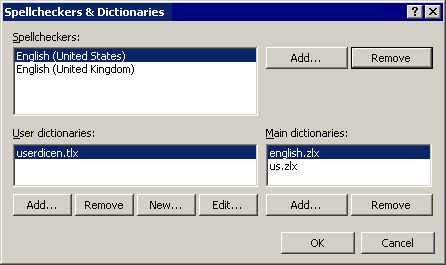
Please also make sure that your document text is marked with a proper language. Current text language is indicated through the status bar of Atlantis.
Please choose the "Tools | Options..." menu command, and click the "Spellcheckers & Dictionaries..." button on the "Spellcheck" tab. Do things look as they do on the following screen capture:
Please also make sure that your document text is marked with a proper language. Current text language is indicated through the status bar of Atlantis.
No good. Yes, I'm getting the right size and so forth.
Here's an interesting twist. "Fluffy" has a red, squiggly line under it, flagging it as misspelled. I select it and do a spellcheck on it. Guess what the suggested replacement is? Yes, "fluffy".
BTW, "burgundy" is also a color and, as such, can be spelled lowercase.
Here's an interesting twist. "Fluffy" has a red, squiggly line under it, flagging it as misspelled. I select it and do a spellcheck on it. Guess what the suggested replacement is? Yes, "fluffy".
BTW, "burgundy" is also a color and, as such, can be spelled lowercase.
You are right. "burgundy" is also a color. The corresponding entries within the English spellcheck lexicon of Atlantis will be corrected.
If you notice that Atlantis reports proper words as misspelt, you can post them to this forum, or email to support@AtlantisWordProcessor.com. Thanks.
Could you please send your custom (user) English dictionary "C:\Program Files\Atlantis\Spellcheck\Lex\userdicen.tlx" to support@AtlantisWordProcessor.com?
If you notice that Atlantis reports proper words as misspelt, you can post them to this forum, or email to support@AtlantisWordProcessor.com. Thanks.
Could you please send your custom (user) English dictionary "C:\Program Files\Atlantis\Spellcheck\Lex\userdicen.tlx" to support@AtlantisWordProcessor.com?
Thanks for the dictionary file. There are only 6 words. All them are proper names.
I cannot reproduce any problem with the "fluffy" word even after loading your custom dictionary. Do you have more custom dictionaries (normally with the .tlx file extension) under the "C:\Program Files\Atlantis\Spellcheck\Lex" folder?
I cannot reproduce any problem with the "fluffy" word even after loading your custom dictionary. Do you have more custom dictionaries (normally with the .tlx file extension) under the "C:\Program Files\Atlantis\Spellcheck\Lex" folder?
Note that the AutoCorrect "replace ... with ..." items can also affect the spellchecking in Atlantis. Have you ever instructed Atlantis to automatically replace "fluffy" with another word?
The spellchecker never makes automatic corrections to the document text. But the spellchecker of Atlantis does cooperate with the AutoCorrect feature. The spellchecker does not red-underline various "exceptions" of the AutoCorrect. Plus the spellchecker might suggest replacements for red-underlined words based on the information provided by the AutoCorrect.
Hi Mike,
According to all of our dictionaries, “behove” is the standard spelling in British and Canadian English. And if I am to believe the OED (Oxford English Dictionary) among these dictionaries, “the spelling with -oo- is now restricted to the United States.” The “Webster’s Unabridged Dictionary” gives “behove” as “chiefly British”.
So if you type “behove” in texts marked with the “US English” language coding, it is quite normal that Atlantis should flag it as misspelt.
HTH.
Cheers,
Robert
According to all of our dictionaries, “behove” is the standard spelling in British and Canadian English. And if I am to believe the OED (Oxford English Dictionary) among these dictionaries, “the spelling with -oo- is now restricted to the United States.” The “Webster’s Unabridged Dictionary” gives “behove” as “chiefly British”.
So if you type “behove” in texts marked with the “US English” language coding, it is quite normal that Atlantis should flag it as misspelt.
HTH.
Cheers,
Robert