Bullets
Bullets
My copy of Atlantis performs flawlessly except for the bullets. If I click on the default bullet I get a clock face insteat of the dot. If I sellect the second bullet I get a square with a cross in it. All the rest work normally. Naturally, I want to use just a plain dot but cannot get one except the bold one in #4.
Hi,
Do you mean that the bullets drop-down list shows the right bullet pictures or symbols but a different image gets inserted when you click on the default bullet, or on the second bullet?
Or do you mean that the bullets drop-down list shows wrong bullet pictures or symbols for the first and second item? If this is the case, you can easily restore the original Atlantis List Gallery and the default plain dot bullet in the following way:
1. Click “Format | List… > Simple Bulleted”.
2. Press the bottommost button to the right of the List Gallery (“Restore default List Gallery”).
Hope this helps.
Cheers,
Robert
Do you mean that the bullets drop-down list shows the right bullet pictures or symbols but a different image gets inserted when you click on the default bullet, or on the second bullet?
Or do you mean that the bullets drop-down list shows wrong bullet pictures or symbols for the first and second item? If this is the case, you can easily restore the original Atlantis List Gallery and the default plain dot bullet in the following way:
1. Click “Format | List… > Simple Bulleted”.
2. Press the bottommost button to the right of the List Gallery (“Restore default List Gallery”).
Hope this helps.
Cheers,
Robert
Bullets
I normally use the bullet list under the icon on the tool bar. The drop down shows the bullet I want to use but when I select it, up comes the clock face. I tried to restore the list as suggested but it did not effect the drop down list.
Thanks for your suggestion but it didn't help...
JimB
Thanks for your suggestion but it didn't help...
JimB

Could you please save your document with a wrong bullet, and send it to support@AtlantisWordProcessor.com?
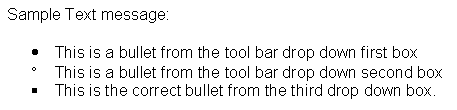
Thanks for the document file. The bullet codes within the file are OK. We cannot reproduce any problem. I have no idea why it displays incorrectly on your system. On my system it displays as intended:
What is your Windows version: 95, 98, Me, NT, 2000, XP, or Vista?
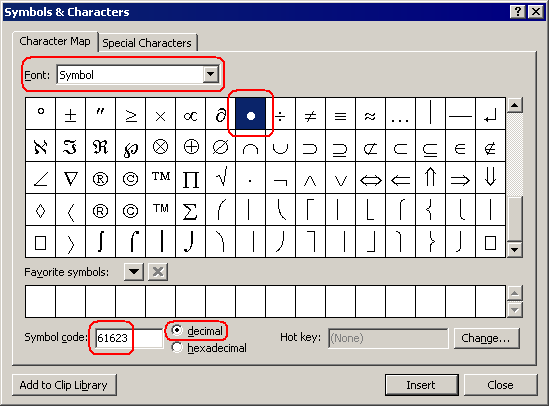
Please choose the "Insert | Symbol..." menu command of Atlantis, choose the "Symbol" font from the "Font" drop-down box, and type "61623" in the "Symbol code" box. Do you get a "bullet" character glyph as on the following screen capture:
What is your Windows version: 95, 98, Me, NT, 2000, XP, or Vista?
Please choose the "Insert | Symbol..." menu command of Atlantis, choose the "Symbol" font from the "Font" drop-down box, and type "61623" in the "Symbol code" box. Do you get a "bullet" character glyph as on the following screen capture:
Hi,
If I remove the “Symbol” font from the Windows Control Panel “Fonts” Applet, I get the same problem as you do, i.e. the first bullet in the Atlantis drop-down is a clock…
If I reinstall the “Symbol” font in my Windows Control Panel “Fonts” Applet, the first bullet in the Atlantis drop-down is a plain dot image again.
I suggest you install/reinstall the “Symbol” font on your Windows system.
Cheers,
Robert
If I remove the “Symbol” font from the Windows Control Panel “Fonts” Applet, I get the same problem as you do, i.e. the first bullet in the Atlantis drop-down is a clock…
If I reinstall the “Symbol” font in my Windows Control Panel “Fonts” Applet, the first bullet in the Atlantis drop-down is a plain dot image again.
I suggest you install/reinstall the “Symbol” font on your Windows system.
Cheers,
Robert