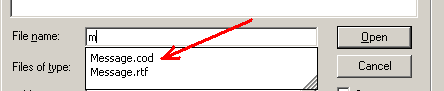
A very useful feature when opening a file is the preview given to the right of the file names list. Actually its invaluable when there are many files on one subject.
However, a strange thing happens if you type in part of the filename in the File name line. All files starting with a similar beginning will be listed below that line and you can make you selection from there. But then there is no preview. For example I belong to an association whose name begins with HRA, and by typing HRA all the files relating to that subject are listed from which I make my choice.
But the preview area has a message in it stating (None).
This is no train smash because I simply use Ctrl O Shift Tab which takes me to the complete file list and then I type in HRA (quickly) and that takes me to the files I’m looking for, complete with the preview.
I mention this in case anybody else has the problem.