I'm loving this Power Type feature. I'm a translator working in Finance, and adding 50 or so terms to Power Type for a project speeds things up by a huge amount.
It occurs to me that an import / export feature would make Atlantis into the most user-friendly Translation Memory tool on the market. A keyboard shortcut to add terms to the list would be handy as well.
In the meantime, is there a manual way to access the items in the Power Type list? I can't find anything in the installation directory.
Many thanks and great work.
Import / Export Power Type List

The Power Type data is stored under the "C:\Program Files\Atlantis\Spellcheck\" folder. You could notice files with the .cache extension under this folder. You could transfer your Power Type lists (plus all the accompanying Power Type data) simply by copying those .cache files to the corresponding Spellcheck folder on another PC.
Atlantis has the "Add to Power Type" command under the "Tools" category. This command adds the selected word in the document window to the Power Type list. You could assign a hot key to this command through the "Tools | Hot Keys..." menu command of Atlantis:
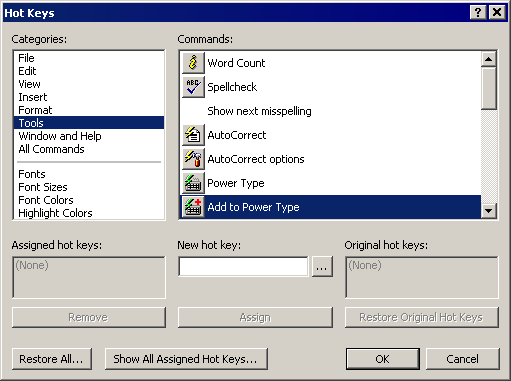
Alternatively you could place this command onto the toolbars of your Atlantis through the "Tools | Toolbars..." menu command.
Atlantis has the "Add to Power Type" command under the "Tools" category. This command adds the selected word in the document window to the Power Type list. You could assign a hot key to this command through the "Tools | Hot Keys..." menu command of Atlantis:
Alternatively you could place this command onto the toolbars of your Atlantis through the "Tools | Toolbars..." menu command.
Hi,
You can get a listing of your Power Type entries in the following way:
1. Download and install "SysExporter" from http://www.nirsoft.net
2. Launch Atlantis and click "Tools | Power Type..."
3. Launch SysExporter, locate and select the "Power Type > Listbox" entry.
4. Right-click in the bottom half of the SysExporter window, and select "Choose Columns".
5. In the "Column Settings" dialog, uncheck the "Value" option. OK out of the dialog.
6. Press Ctrl+A to select all items in the bottom half of the SysExporter window.
7. Press Ctrl+C to copy the selection.
8. Close the Atlantis Power Type dialog.
9. Paste the clipboard contents (Ctrl+V) into the Atlantis Clippy Bank or anywhere suitable.
Cheers,
Robert
You can get a listing of your Power Type entries in the following way:
1. Download and install "SysExporter" from http://www.nirsoft.net
2. Launch Atlantis and click "Tools | Power Type..."
3. Launch SysExporter, locate and select the "Power Type > Listbox" entry.
4. Right-click in the bottom half of the SysExporter window, and select "Choose Columns".
5. In the "Column Settings" dialog, uncheck the "Value" option. OK out of the dialog.
6. Press Ctrl+A to select all items in the bottom half of the SysExporter window.
7. Press Ctrl+C to copy the selection.
8. Close the Atlantis Power Type dialog.
9. Paste the clipboard contents (Ctrl+V) into the Atlantis Clippy Bank or anywhere suitable.
Cheers,
Robert