Banner creation question. - "user error"

General comments and questions. Technical support.
Post Reply
Joi
Posts: 2
Joined: Wed Jan 09, 2008 7:58 am
Location: USA

Banner creation question. - "user error"

Post by Joi »

Greetings,

I seem to be having trouble creating a banner in Atlantis.. I attempted to follow the steps below, but I am missing something? I understand steps 1 and 2, but step three has me stuck. :oops: I hate to ask for a screen shot, but...

http://www.atlantiswordprocessor.com/en ... antips.htm

Would you like to be able to use such title banners in your documents?

Here are the exact steps involved:

1) Place your mouse pointer on the horizontal ruler at the 2.5" value. Click when you get the Add new tab position: 2.5" bubble tip.

2) Press the TAB key.

3) Select the tabbed line, then apply

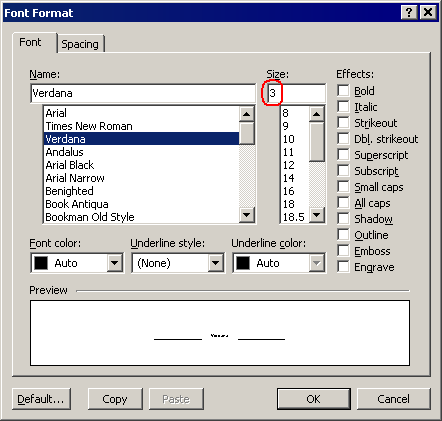
a font size of 3 pts,
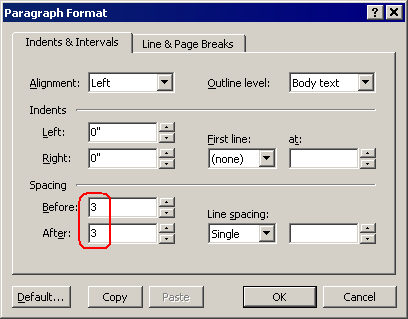
a paragraph Space Before value of 3 pts,
a paragraph Space After value of 3 pts,
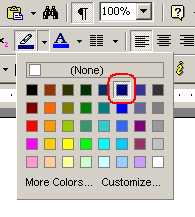
the Navy highlight color.
You should get the following:
User avatar
admin
Site Admin
Posts: 2954
Joined: Wed Jun 05, 2002 10:48 pm
Contact:

Post by admin »

If you have questions, please do not hesitate to ask.

You can apply a font size to the selection in a document through the "Font Format" dialog. Just choose the "Format | Font..." menu command, click in the "Size" box, type the required font size, and press Enter:

Image

The easiest way to change the spacing before/after the selected paragraphs is the "Paragraph Format" dialog. Choose the "Format | Paragraph..." menu command, and type the desired numbers within the "Before" and "After" boxes:

Image

You can apply the desired highlight color to the selected text by clicking this color in the drop-down palette of the "Highlight" toolbar button:

Image
Robert
Posts: 1906
Joined: Fri Aug 15, 2003 8:27 pm

Post by Robert »

Hi,
Are you having trouble selecting the tabbed line (actually the tabbed character)? You might find it easier if you turn the "Special Symbols" mode on (Ctrl+Shift+"8").

You'll select the tabbed line by placing the mouse cursor to the left of the line until the arrow cursor somehow points to the line. If you give a mouse click then, the tabbed line will automatically be selected.

Now here is an alternative method to achieve the same results:

1. Select the tabbed line.
2. Press Ctrl+k,C to duplicate the selection.
3. Press Ctrl+K,C as many times as necessary to create the required number of (tabbed) lines (in our example, twice). Note that there is also a convenient toolbar button to duplicate a selection.
4. When you have 3 lines, press Ctrl+A to select them all.
5. Press Ctrl+Shift+G to open the Paragraph dialog.
6. Apply a "Space Before" value of 3 pts.
7. Apply a "Space After" value of 3 pts.
8. OK out of the Paragraph dialog.
9. Click in the Font Size edit box, and type "3" from the keyboard.
10. Press the Enter key.
11. Click in the document window, and place the mouse cursor to the left of the second line (second tabbed character).
12. Click to select the second line.
13. Click in the Font Size edit box, and type "16" from the keyboard.
14. Press the Enter key.
15. Use the appropriate toolbar button to apply an Aqua Font color.
16. Reselect the second line.
17. Use the corresponding toolbar button to apply a Blue Highlight color.
18. Click to place the mouse cursor to the beginning of the second line.
19. Type your text ("Atlantis Word Processor" in our example).
20. Place the mouse cursor to the left of the first line.
21. Click to select the first line.
22. Press the Ctrl key and hold it down.
23. Place the mouse cursor to the left of the third line.
24. Click to select the third line. Both the first and the third lines should now be selected.
25. Use the corresponding toolbar button to apply a Navy Highlight color.

This should achieve the desired results.

Hope this helps.
Cheers,
Robert
Joi
Posts: 2
Joined: Wed Jan 09, 2008 7:58 am
Location: USA

Post by Joi »

Hello,

Thank you site admin and Robert for your detailed response. With your help I was able to create the banner in Atlantis.

God Bless.
Joi
Attachments
atlantis_banner.jpg
atlantis_banner.jpg (6.02 KiB) Viewed 8328 times
Post Reply