Alright, well I've had Atlantis for a few months now, and only in the past week or so have I had this problem, so I'm not quite sure what I button I pushed to bring it on! At any rate, I have Atlantis version 1.6.1.7, the normal one, not the U3 one. I also have Windows Vista, if that helps anyone figure out what's wrong with it...
My problem is my spellchecker will no longer work. It says (on the bottom and according to all my settlings) that it's using the English - United States language, but it won't when I click on the spell check option it says that it's not installed. But it is installed, because I made sure it was added to the spellcheckers/dictionary setting. What's worse, is everything is underlined, which I guess according to Help means that my document has no spellchecker.
I've searched around here to find other spellcheck problems, but the U3 thing doesn't apply to me because I don't have that version, and the other one I found- something about changing part of the code in the English (America) dictionary, doesn't work. So... I have no idea what's wrong or how to fix it.
And yes, I have tried uninstalling it and putting it back in. The spellcheck works when it first opens, but then when I close it and open it back up, it stops working.
Help?
Spellcheck problem.
-
forsakenrain
- Posts: 6
- Joined: Sun Oct 14, 2007 5:37 pm

-
forsakenrain
- Posts: 6
- Joined: Sun Oct 14, 2007 5:37 pm
Yeah, that's what the file is called.Do you mean "English (American).asc"?
No, and no. Well for the second question, it wasn't working so I uninstalled it and then reinstalled it, but it still refused to work. So even if I did on accident, it wasn't working before then anyway.Did you make changes to the spellcheck files of Atlantis? Did you run multiple copies of Atlantis concurrently?
Do you mean the following steps:
- you uninstall Atlantis, then reinstall it;
- you launch Atlantis;
- you use the "Tools | Spellcheck..." command of Atlantis to spellcheck the active document - everything works correctly;
- you close Atlantis, then launch it again;
- you use the "Tools | Spellcheck..." command of Atlantis to spellcheck the active document - Atlantis displays the error message saying that you do not have the English spellchecker.
Is that correct?
- you uninstall Atlantis, then reinstall it;
- you launch Atlantis;
- you use the "Tools | Spellcheck..." command of Atlantis to spellcheck the active document - everything works correctly;
- you close Atlantis, then launch it again;
- you use the "Tools | Spellcheck..." command of Atlantis to spellcheck the active document - Atlantis displays the error message saying that you do not have the English spellchecker.
Is that correct?
-
forsakenrain
- Posts: 6
- Joined: Sun Oct 14, 2007 5:37 pm
Do you launch Atlantis through the standard Desktop shortcut or through the corresponding shortcut from the "Start > Programs" menu? Have you ever used Atlantis with any command-line switches?
If you do not launch Atlantis in any custom way, the problem might be that your Atlantis is unable to save its settings to the Windows Registry on close. When you experience problems with the spellchecker, please choose the "Tools | Options..." menu command of Atlantis, and save your current Atlantis settings to an INI file. Please send this INI file to support@AtlantisWordProcessor.com
Note that you can always add any available spellchecker to the list of the installed spellcheckers through the topmost "Add..." button of the "Tools | Options... > Spellcheck > Spellcheckers & Dictionaries..." dialog of Atlantis.
If you do not launch Atlantis in any custom way, the problem might be that your Atlantis is unable to save its settings to the Windows Registry on close. When you experience problems with the spellchecker, please choose the "Tools | Options..." menu command of Atlantis, and save your current Atlantis settings to an INI file. Please send this INI file to support@AtlantisWordProcessor.com
Note that you can always add any available spellchecker to the list of the installed spellcheckers through the topmost "Add..." button of the "Tools | Options... > Spellcheck > Spellcheckers & Dictionaries..." dialog of Atlantis.
-
forsakenrain
- Posts: 6
- Joined: Sun Oct 14, 2007 5:37 pm
Thanks for the INI file. I can already say that there is a problem with the list of installed spellcheckers in your Atlantis. It includes one extra item - "C:\Program Files\Atlantis\Spellcheck\Lex\English (American).cache" - which is not a spellchecker at all. Your "Tools | Options… > Spellcheck > Spellcheckers & Dictionaries…" dialog includes that extra item:
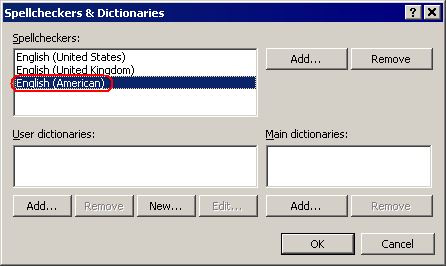
Please highlight (click) that extra item in the "Spellcheckers & Dictionaries…" dialog, then click the topmost "Remove" button to remove it from the list of installed spellcheckers. Then OK out of the dialogs.
If you still have problems in Atlantis, some Atlantis files or settings are still invalid. Please make a clean install of Atlantis. It would be better if you removed the "C:\Program Files\Atlantis\" folder from your hard disk after uninstalling Atlantis. If this folder includes your custom files, you could backup them.
This time please do not modify system files of Atlantis. Also please do not make changes in the "Spellcheckers & Dictionaries…" dialog.
Please highlight (click) that extra item in the "Spellcheckers & Dictionaries…" dialog, then click the topmost "Remove" button to remove it from the list of installed spellcheckers. Then OK out of the dialogs.
If you still have problems in Atlantis, some Atlantis files or settings are still invalid. Please make a clean install of Atlantis. It would be better if you removed the "C:\Program Files\Atlantis\" folder from your hard disk after uninstalling Atlantis. If this folder includes your custom files, you could backup them.
This time please do not modify system files of Atlantis. Also please do not make changes in the "Spellcheckers & Dictionaries…" dialog.
-
forsakenrain
- Posts: 6
- Joined: Sun Oct 14, 2007 5:37 pm
Hm. Well, when I opened: "Tools | Options… > Spellcheck > Spellcheckers & Dictionaries…" It didn't say English (United States), English (United Kingdom), English (American). It said English (American), English (United Kingdom), English (American). But I deleted the second American, and I still have the same problem.
I'm going to completely wipe Atlantis from my system and re-install it as you suggested, however. I'll not touch anything and see if it does it again. I'll let you know.
EDIT: Nope. Still doesn't work.
I'm going to completely wipe Atlantis from my system and re-install it as you suggested, however. I'll not touch anything and see if it does it again. I'll let you know.
EDIT: Nope. Still doesn't work.
Yes, different versions (including language versions) of Windows might use different titles (names) for the same language dialect. This is why some versions of Windows say "English (United States)" or "English (American)" for the US English dialect. But in any case, the third spellchecker in your Atlantis was invalid.Well, when I opened: "Tools | Options... > Spellcheck > Spellcheckers & Dictionaries..." It didn't say English (United States), English (United Kingdom), English (American). It said English (American), English (United Kingdom), English (American).